
Dashboard Overview
Your centralized operational view for monitoring store activity, orders, payments, fulfillment, and business performance.
In plain words
The dashboard is the front page of your shop's back office. It shows today at a glance — what sold, what is waiting to be shipped, what needs you — so you know where to go next instead of guessing.
What this is
The Trapyfy dashboard provides a centralized operational view of your store activity, orders, payments, fulfillment, customers, and performance metrics. Merchants use the dashboard to monitor daily operations, identify issues quickly, and track business performance in real time.
What merchants can monitor
The dashboard helps merchants monitor:
- Active orders
- Payment activity
- Fulfillment progress
- Customer activity
- Product performance
- Revenue trends
- Operational alerts
- Inventory visibility
Core dashboard sections
Orders
The orders section provides visibility into orders across their lifecycle statuses:
- Pending payment — awaiting payment confirmation
- Paid — payment confirmed
- Completed — delivered and closed
- Cancelled — cancelled by merchant or customer
- Fulfillment progress
Review order activity regularly to identify delays or operational issues.
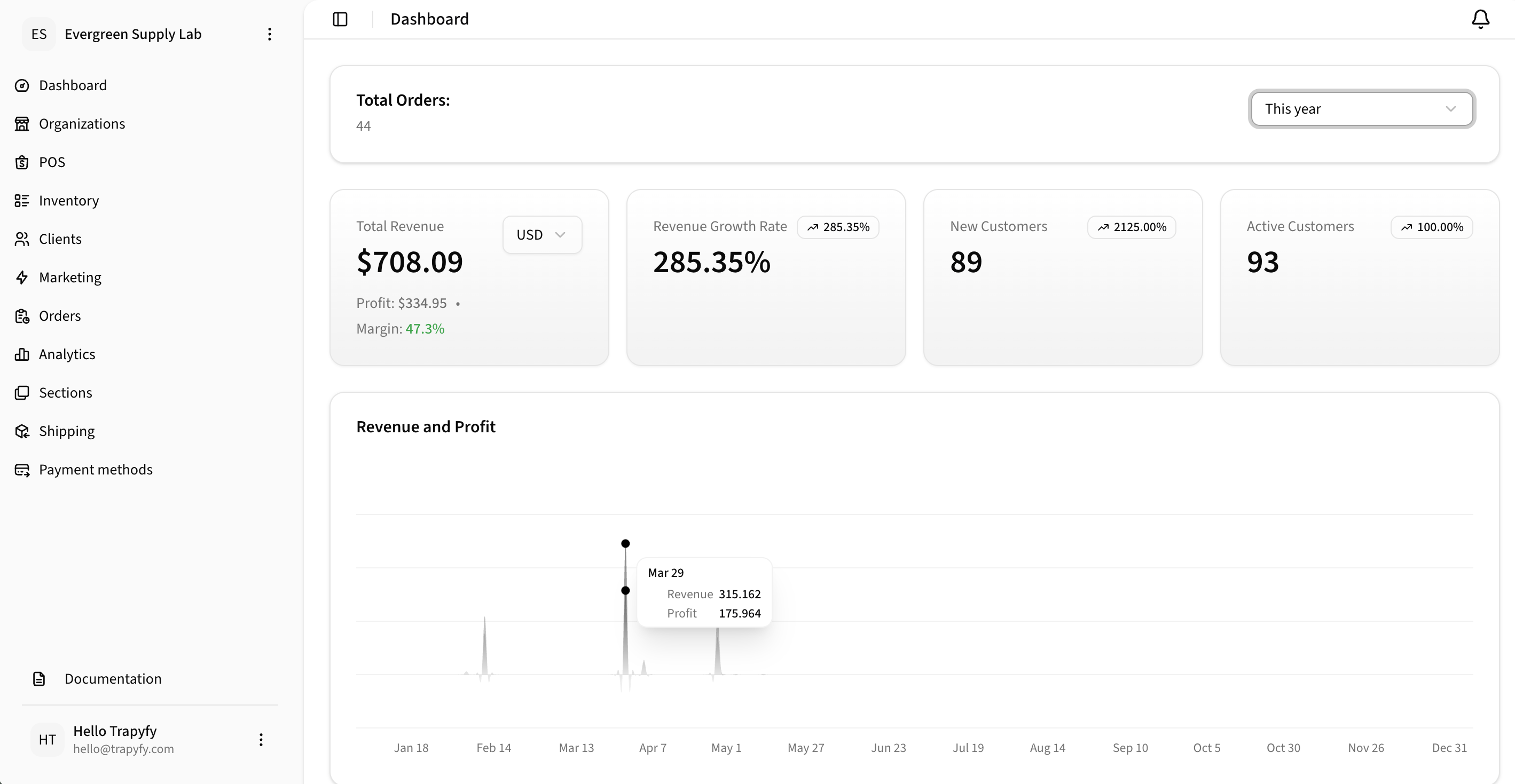
Use the dashboard to monitor store performance, revenue, profit, margin, customer growth, and order activity.
Revenue and payments
The revenue section provides visibility into:
- Completed payments
- Payment volume
- Settlement visibility
- Transaction trends
- Payment success rates
This helps merchants monitor overall business performance and payment health.
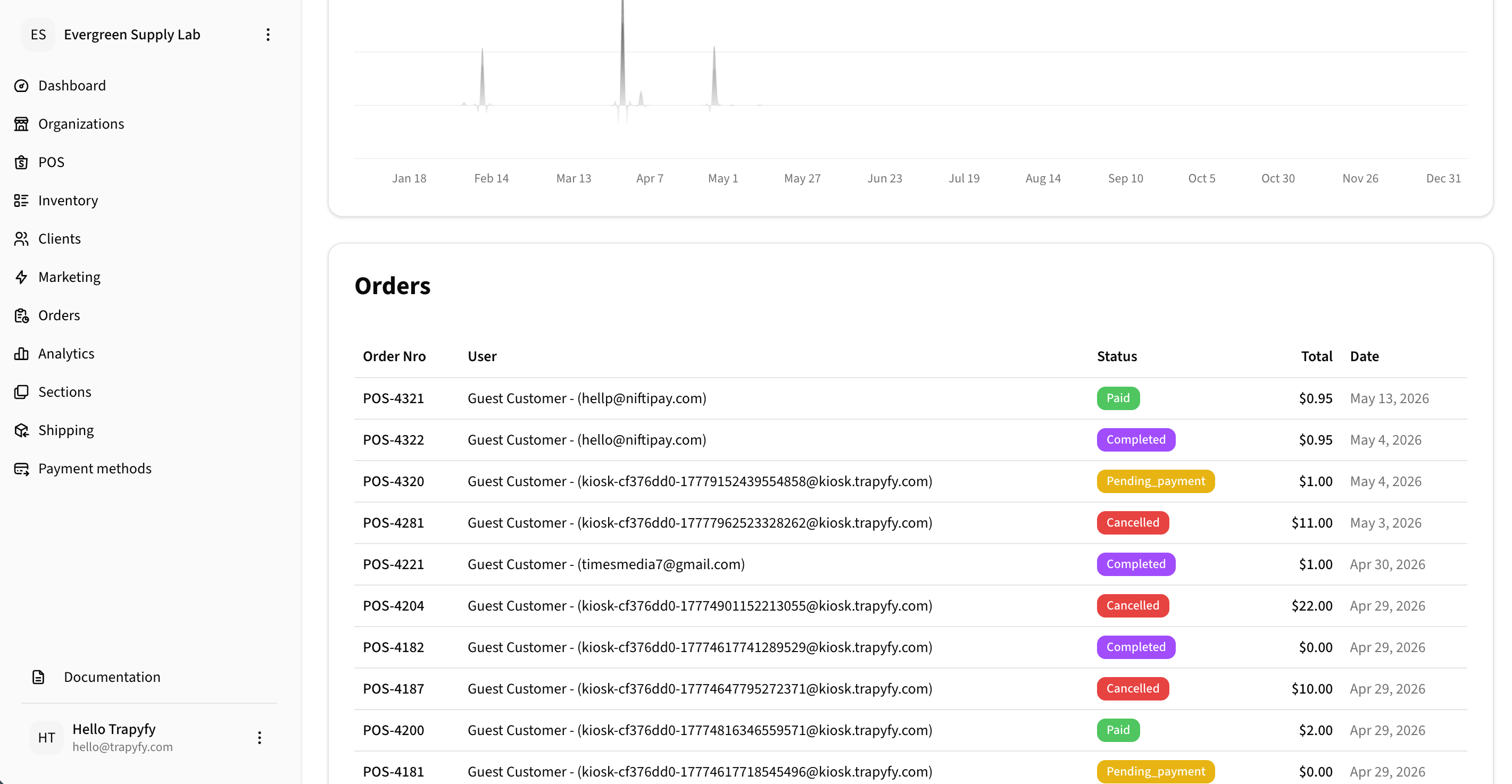
Recent orders help merchants quickly monitor customer activity and order status from the dashboard. Detailed order management happens in the Orders module.
Customers
The customer section helps merchants understand:
- Returning customers
- Customer order behavior
- Customer activity trends
- Support-related activity
This can help identify high-value customers and operational friction points.
Supplier analytics
For merchants using dropshipping and shared products, the analytics section provides visibility into:
- Supplier payables — the total amount owed to suppliers based on completed and pending supplier orders, calculated using transfer costs
- Reseller margin — the difference between the retail price paid by the customer and the transfer cost owed to the supplier
- Retailer vs dropshipper reporting — analytics can distinguish between direct retail revenue and revenue routed through reseller channels
- Reconciliation workflows — track outstanding payables across supplier orders to manage payment obligations
- Transfer cost reporting — review transfer costs per product and country to monitor supplier pricing and margins
For full dropshipping and supplier order workflows, see the Dropshipping & Shared Products guide.
Inventory visibility
Inventory tracking provides visibility into:
- Available stock
- Low inventory products
- Reserved inventory
- Out-of-stock products
Review inventory regularly to avoid fulfillment interruptions.
Operational alerts
Operational alerts help merchants identify issues that may require attention.
Examples may include:
Failed payments
Delayed fulfillment
Low inventory
Payout issues
Fraud or risk alerts
Best practices
Review the dashboard daily
Daily monitoring helps identify operational issues before they impact customers.
Monitor failed payments
Unexpected payment failures may indicate customer friction or payment configuration issues.
Watch inventory levels closely
Low inventory can disrupt fulfillment and customer satisfaction.
Use trends to improve operations
Revenue, order, and customer trends can help merchants optimize products, promotions, and fulfillment workflows.
Related videos
Watch the dashboard and operational walkthrough videos for a visual explanation of dashboard workflows.
View Video LibraryRelated pages
Need help?
Email [email protected] with your merchant name, store or order reference, screenshots or error messages, and a short description of the issue.